Adaptive Watersheds
The adaptive watershed can segment images of particles and other regularly shaped objects into different regions by treating their inverse distance maps as a landscape and the local minima as markers. By labeling each segmented region with a unique index, different particles can be separated, identified, and subsequently analyzed.
Right-click the required ROI and then choose Adaptive Watershed in the pop-up menu to compute an adaptive watershed on a region of interest. The output is a multi-ROI in which the segmented particles are identified and indexed, as shown below.
From left to right: original dataset, input ROI , and output multi-ROI with grains identified and indexed
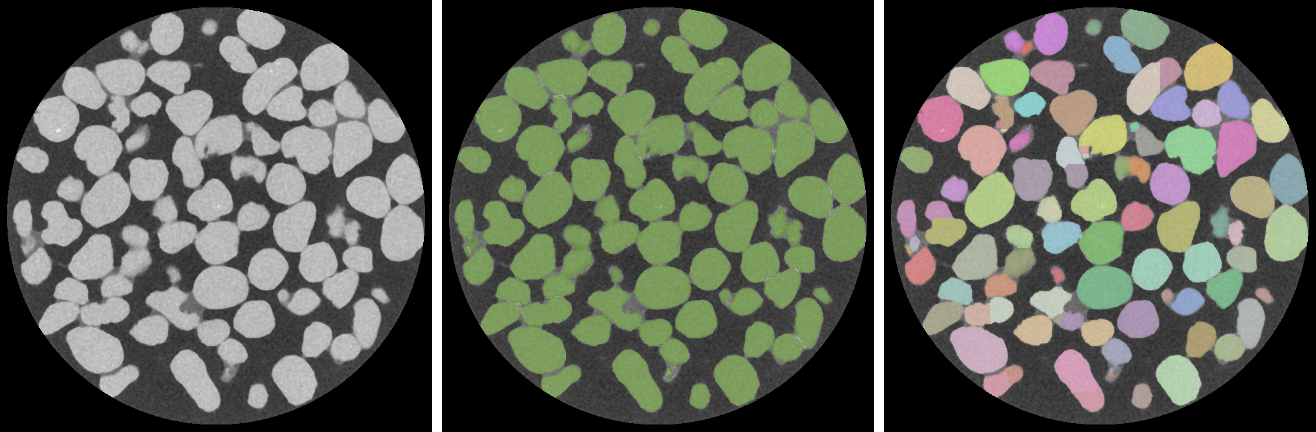
You should note that the performance of the algorithm may be compromised if the particles are irregularly shaped, overlapped, or are overly connected.
-
Create the region of interest that will provide the inverse distance map as the landscape and the local minima as markers.
Note In many cases, you should be able to apply a threshold to segment the particles in the original image (see Creating Threshold Segmentations). You can also use any of the ROI Painter tools or other segmentation tools to create the required region of interest (see About the Segmentation Tools).
- Right-click the region of interest and then choose Adaptive Watershed in the pop-up menu.
The watershed is evaluated with the selected region of interest. Wait for the markers to be expanded and then written into a new multi-ROI.
Note You may notice that the resulting multi-ROI includes some particles are split between multiple labels, as circled below.

In this case, you will need to merge the labels into one (see Classes and Scalar Information).
